1. Remote HA panel — without Nabu Casa
Open your HA dashboard from the Sensmos app, anywhere, through the tunnel your node holds open:
- No Nabu Casa subscription, no VPN, no port forwarding, no public IP — works behind CGNAT.
- Owner-only: every request is signed by your wallet; the tunnel needs a pairing key that only your phone writes onto the node.
- Tiles you can arrange: chart, reading, switch, light, button; scripts and scenes as buttons.
Switch it on: node → Settings → Remote access → Pair (on the node's Wi-Fi), then add HA panel on the node card and enter HA's LAN address and a long-lived token. Details in Remote access.
2. HACS integration (sensmos-homeassistant)
Install through HACS → Custom repositories → https://github.com/Galusz/sensmos-homeassistant (Integration). Add the integration and choose how to connect: Physical node (the node's LAN IP and PIN — the entities below), Data only (your HA sensors on the map as a software node, no hardware) or Sensmos account (your LoRaWAN gateways — below).
What appears in HA:
| Entity | What it is |
|---|---|
sensor.<node>_* | every reading the node publishes (own sensors, native ones, data you subscribed to from other nodes) |
mon.* diagnostics | Wi-Fi signal, ping/jitter/loss to the network, link quality |
binary_sensor.<node>_online, _backend_ws | node reachable on LAN / node connected to the network |
binary_sensor.<node>_lora_emergency | ON while the node has lost its uplink and is broadcasting over LoRa |
sensor.<node>_lora_frame, _lora_frame_sub_N | last LoRa frame per sensor behind the node (attributes: encrypted, via radio/backend, time) |
sensor.<node>_lora_last_command, _lora_role | last emergency command received; radio role (point/scanner) |
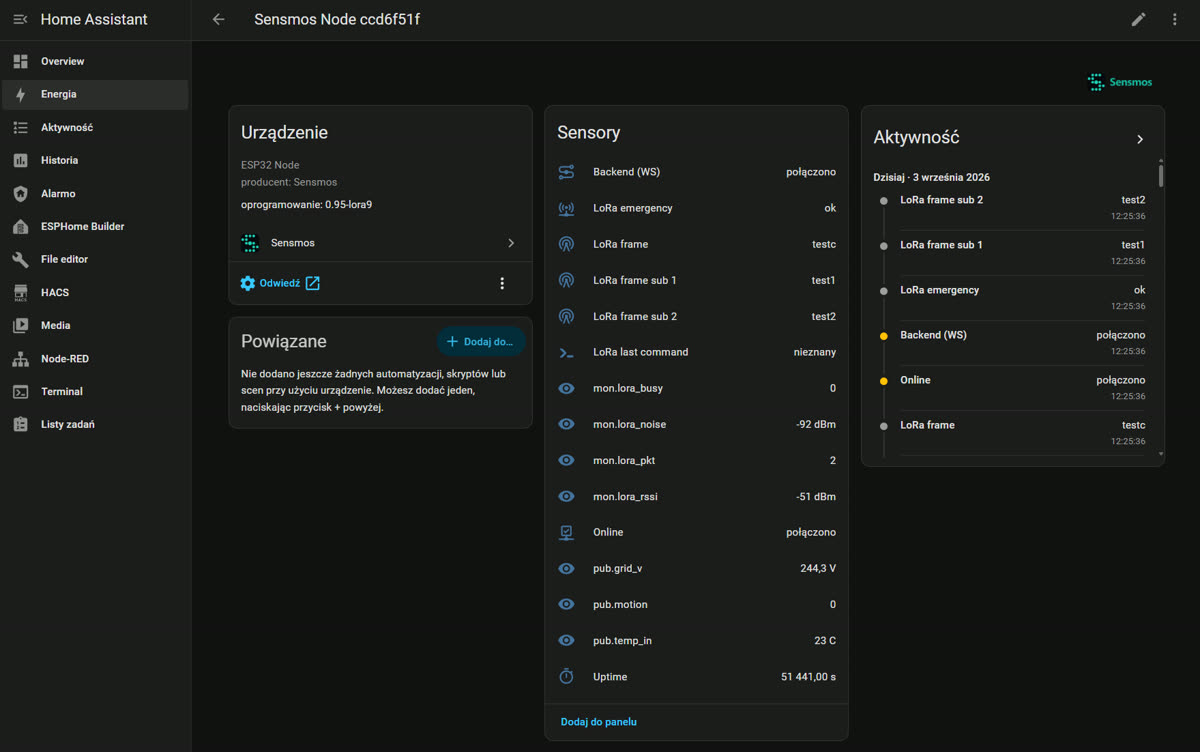
Events for automations: sensmos_message (a message reached the node), sensmos_lora_frame (every LoRa frame, one event each), sensmos_lora_cmd. Each LoRa frame is also a line in the device's logbook.
Services:
sensmos.push— write a value into the node as an entity (own.*), e.g. your tariff, a boiler state, anything a script on the node should react to.sensmos.lora_send— transmit a LoRa frame from the node's radio to one of its sensors (or another node):dst,sub,payload,aes.
Feeding the node from HA is configured in the integration options: map any HA entity to a node entity; the integration pushes changes (throttled, with a keepalive). Units are converted where it makes sense.
Example: when the node goes off-grid, tell the owner over LoRa
trigger:
  - platform: state
    entity_id: binary_sensor.garage_lora_emergency
    to: "on"
action:
  - service: sensmos.push
    data:
      entity_id: own.status
      value: "ALARM"
If own.status is one of the node's four emergency entities, the word goes out over the radio and shows in the owner's Emergency Panel — with the internet down. Values are ASCII, max 8 characters.
Example: actuate a LoRa valve from an HA automation
service: sensmos.lora_send
data:
  dst: ccd6f51f     # your node's id8
  sub: 3            # the valve's sub-address
  payload: "valve=off"
Sensmos account mode — your LoRaWAN gateways
For a LoRaWAN gateway paired with your wallet in the app, Home Assistant itself is the base: your sensors' frames reach it from the Sensmos server exactly as the sensor sent them — encrypted frames stay encrypted — and HA decrypts them itself; plain frames are accepted only if you switch on the option below (the gateway side: LoRa). Requires Home Assistant 2024.12 or newer and integration 0.8.0 or newer.
- Pairing: choose Sensmos account; HA shows a code — type it into the app under Settings → Paired devices → Pair. The app hands HA a revocable token with the scopes
lora.rxandlora.tx; your wallet never goes into HA. Revoke the token in the app under Paired devices and HA asks you to pair again. - Devices: every gateway paired with your wallet appears as a device.
- Options, per gateway: Key phrase — the same key phrase your sensors use; only its SHA-256 (the key) is stored, and an empty field keeps the current key. Also accept plain frames (no encryption) — billed as plain frame receive: off by default.
- If HA is offline, frames for your gateways are dropped, just as for a node that is offline. Reception is billed as for a node base: see LoRa.
- Receive only: sending to sensors through the gateway is not available in this mode.
| Entity (per gateway) | What it is |
|---|---|
| LoRa frame sub N | last frame from the sensor with sub-address N (attributes: encrypted, via radio/backend, time); appears with its first frame |
| Online | the gateway's forwarder has reported to Sensmos in the last 3 minutes |
| Beacons sent, Last beacon | Sensmos beacons the network transmits through your gateway |
| Sensmos beacons heard (24 h) | beacons of Sensmos nodes the gateway heard in the last 24 hours |
| Nodes heard (24 h) | how many Sensmos nodes the gateway heard in the last 24 hours |
| Heard by nodes (24 h) | how many Sensmos nodes heard the gateway in the last 24 hours |
The diagnostic entities (all except LoRa frame sub N) become unavailable when Home Assistant has had no update from the server for 3 minutes. Every frame also fires the sensmos_lora_frame event and gets a line in the gateway's logbook.
3. MQTT (local broker)
Independently of HACS, the node can publish to your own Mosquitto: status, diagnostics, entities with Home Assistant discovery, plus message/lora_cmd and lora_frame topics. Configure it on the node: Settings → MQTT. Works with the internet down.
4. A watchdog for HA — the thing Nabu Casa cannot do
Your HA already watches your home. Who watches HA? The node monitors your HA instance from outside it (a monitor on the node, plain HTTP/TCP) and pushes an alert to your phone when it stops responding — including the case where HA is dead and so are its own notifications. Set it up under Monitors on the node.
Price
The HACS integration, MQTT and monitors are free. The remote HA panel is a tunnel: 0.5 GALU per day of use, shared with SSH and LAN panels. LoRa features have their own daily fees — see LoRa and Wallet & fees.