What this is
A node owner has a disk that is on anyway. You have files you would rather not lose. Store connects the two: you buy space by the gigabyte, your device encrypts every file before it leaves, and the ciphertext lands on the disks of other node owners — people, not a data centre.
You are never introduced to them and never deal with them. The backend picks who holds what, moves the bytes, checks that they still have them, and settles the daily charge in GALU.
The key never leaves your device
Every file gets its own random key. That key is wrapped for your box — a keypair derived from a signature made by your wallet, on your device, and nowhere else. There is no copy of it on our side and no code path that could produce one.
What the host receives is a blob with a random identifier. What we store is the ledger: whose file it is, how big it is, block hashes for the proofs, and the encrypted name. We cannot open the name any more than the host can open the file.
One thing we can see, and it is fair to say so plainly: since folders became a real field, the backend knows the shape of your tree — how many folders you have and how many files sit in each. Not their names, not their contents. That is what buys you a file list that opens instantly instead of one that has to be downloaded whole.
The desktop app
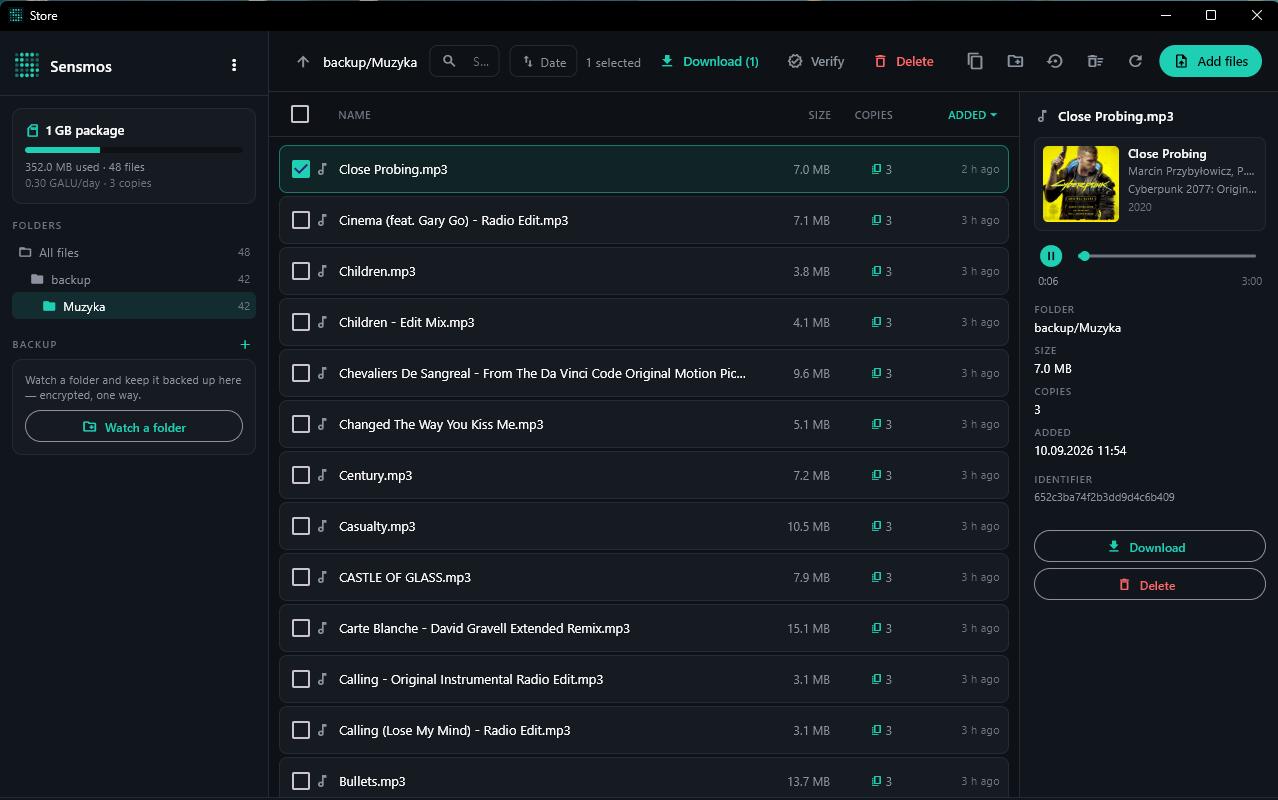
Pair it once from the phone: Settings → Paired devices, type in the code the computer shows. The token is sealed to that computer's own key, so the parcel travels through us without us being able to open it. You choose what the computer may do, and you can revoke it.
One of those permissions is pairing further computers. Tick it and that computer can let the next one in on its own, without you reaching for the phone — useful when the machines are not in the same place. A computer let in that way can never pass the right on again, so the chain is always one link long, and revoking the first one from the phone cuts off everything it let in.
What it does:
- Folders — back at the top, folders under it, files below, exactly like a file manager. Drag and drop anywhere in the window.
- Watched folders — point it at any number of local folders and it keeps them backed up here: encrypted, one way. Deleting something on your disk never deletes the copy.
- Previews — pictures, and music and video played in place. Cover art and tags are read out of the file you already fetched, so they cost no extra transfer.
- Duplicates — compared by the actual content, not by name and size. Same name and same size only means they might match; the app reads both and hashes them before it dares select anything for deletion.
- Transfers and log — what went where, and whether it went straight to the host or through us.
- Choose how many copies — two, three or four, changeable at any time. Fewer copies means a bigger package fits, because every copy has to go to a different owner.
- Buy or grow the package from the desktop, without reaching for the phone.
Download — test builds. There is no official release yet. They come straight off the build machine and are not signed, so Windows SmartScreen and macOS Gatekeeper will both object; on a Mac, open it through right-click → Open the first time.
- Windows x64 — unpack anywhere and run
SensmosStore.exe. No installer. - Linux x64 — unpack and run
sensmos-store. - macOS — unpack and move the app wherever you keep them.
The phone app
The same package, the same files, the same folders. Storage lives under the node list; if you have no nodes yet, it is the only thing on the home screen. Files uploaded from the computer show up on the phone and the other way round — it is one package, not two.
What you pay for
You buy whole gigabytes. The price is 0.1 GALU per gigabyte per copy per day, so a 1 GB package kept in three copies costs 0.3 GALU a day. Size and number of copies are both yours to change whenever you like, as long as what you already keep still fits.
How many copies is worth thinking about once. A host that goes quiet only drops out of your package after three days, and only then is its copy rebuilt somewhere else. With two copies your file spends those days on a single disk; with three, on two. That is why three is what we recommend and what a new package starts with.
More copies also means a smaller package: each one has to sit with a different owner, so the size you can buy is limited by the last owner you need, not by the total free space in the network. The app shows the real ceiling for the number you picked.
Payment is for the package, not for files. Uploading a thousand small files or one big one costs the same, as long as they fit in the space you bought.
If a day's fee does not go through, uploads pause and a notice tells you why. Your files stay downloadable the whole time — nothing is deleted for a missed day, and a single paid day starts everything again.
When something goes wrong
A host goes offline. Its copy stops passing proofs and gets dropped; the package takes on another owner with enough free space, and the copy is rebuilt from the surviving one. You are not asked and do not need to act.
An upload is interrupted. The app remembers what it was sending before it sent it. Anything left unfinished is shown for what it is — not as a file you own — and offered back with Send again, straight from the original on your disk. Entries that never received a single byte anywhere are removed by the backend so the space comes back to you.
A file comes back wrong. It is not kept. The app hashes what it downloaded against the signature it made at upload, and reports the host, which is then put through a proof of its own.